







Tape Library System: Improving Backup Workflow Efficiency
As data volumes grow, backup operations become more complex. Large datasets, overlapping backup schedules, limited drive availability, and inefficient media handling can all delay the completion of backup jobs. These problems are not always caused by insufficient hardware capacity. In many cases, the way data moves through the storage environment has a greater influence on overall workflow efficiency.
A Tape Library System helps organize tape-based data storage by coordinating tape media, drives, robotic handling, and backup software. To improve backup performance, it is important to understand how these elements interact, where delays occur, and how storage operations can be organized more effectively.
How Backup Workflows Become Inefficient
A backup workflow involves more than transferring data to tape. The process may include identifying files, reading data from source storage, preparing backup streams, allocating available drives, loading the required cartridges, writing data, and recording job status. A delay at any stage can affect the entire operation.
For example, a backup application may have sufficient data ready for transfer, but the required tape drive could already be occupied by another job. Alternatively, a drive may be available while the source system cannot deliver data quickly enough to maintain continuous writing. Both situations reduce effective utilization, although their underlying causes differ.
A Tape Library System must operate within these interconnected processes. Adding more storage capacity alone does not necessarily resolve workflow delays. If job scheduling, media availability, or data preparation remains inefficient, additional capacity may provide little improvement to the time required to complete backups.
Drive Availability and Backup Job Scheduling
Tape drives are shared resources in many backup environments. When several jobs require the same drives, the backup application must coordinate access according to its scheduling rules, job priorities, and available resources. If too many jobs begin simultaneously, some may wait for a drive even when other parts of the storage infrastructure have spare capacity. This can create a queue that grows during busy periods. The issue becomes more noticeable when backup windows are short or when multiple applications protect different datasets at the same time.
A well-managed Tape Library System supports more predictable operations by coordinating drive access with media handling and backup software. However, effective scheduling depends on understanding the actual workload rather than simply maximizing the number of concurrent jobs.
Useful scheduling practices include:
-
Separate workloads by operational priority. Critical systems may require earlier completion than routine archival tasks. Assigning appropriate priorities helps prevent lower-urgency jobs from occupying resources needed for time-sensitive backups.
-
Avoid unnecessary schedule overlap. Distributing jobs across available time windows can reduce competition for drives and improve the consistency of backup completion times.
-
Match concurrency to available resources. Starting more jobs does not always increase throughput. The number of simultaneous tasks should reflect drive availability, source-storage performance, network capacity, and software limitations.
-
Review recurring queue patterns. If jobs regularly wait at similar times, the schedule may need adjustment. Historical job logs can help identify periods of concentrated demand.
Media Handling and Cartridge Availability
Robotic media handling is another important part of tape-based backup operations. Each handling step must work in coordination with the backup application. If the required cartridge cannot be located, has been assigned incorrectly, or is unavailable because another task is using it, the backup job may be delayed even when a drive is free.
Media management becomes particularly important when a library contains many cartridges across different backup sets. Clear inventory records, consistent media labeling, and accurate tracking of cartridge locations help reduce unnecessary handling and prevent avoidable job failures.
A Tape Library System also relies on coordination between physical media and the logical records maintained by backup software. If these records become inconsistent, the application may request media that cannot be accessed as expected. Operators may then need to investigate inventory information, media assignments, and recent handling activity before the workflow can continue. Cartridge management should therefore be treated as part of backup planning rather than an administrative task performed only after a problem occurs.
Data Transfer and the Problem of Uneven Throughput
Backup performance depends on the ability of the source system, network, backup application, and tape drive to work together. If one component delivers data more slowly than the next component can process it, the workflow becomes uneven.
For instance, a tape drive may be capable of writing data continuously, but the source storage system may deliver data in intermittent bursts. The drive then experiences periods of reduced activity while waiting for more data. Similarly, network congestion or competing workloads on the source Server may interrupt the data stream.This means that a slow backup does not automatically indicate a problem with the tape library itself. The limiting factor may be outside the library, and changing media or adding drives may not solve it.
When evaluating a Tape Library System, operators should compare job duration with drive activity, source-storage response, network utilization, and backup software logs. The objective is to identify whether the delay occurs before data reaches the library, during media preparation, or while the data is being written.
Data organization can also affect workflow efficiency. Large sequential backup streams may behave differently from workloads containing many small files, because file discovery, metadata processing, and application overhead can contribute significantly to total completion time. Backup policies should reflect the characteristics of the data rather than assuming every workload will perform in the same way.
Monitoring and Troubleshooting Backup Delays
Consistent monitoring makes it easier to distinguish occasional fluctuations from recurring operational problems. A single slow job may result from an unusual workload or temporary resource contention. Repeated delays at the same stage usually provide a stronger indication that a workflow needs adjustment. Effective troubleshooting begins with a clear record of job start times, completion times, media requests, drive allocation, errors, and periods of inactivity. Comparing these records across several backup cycles can reveal patterns that are difficult to identify from a single job report.
Common warning signs include repeated waiting for drives, delays during cartridge loading, interrupted data streams, unexpected media requests, and jobs that regularly exceed their planned backup windows.
A practical troubleshooting sequence is to:
-
Identify which backup jobs are consistently delayed and determine whether they share a schedule, dataset, drive, or media group.
-
Review job logs to establish whether the delay occurs during resource allocation, cartridge loading, data transfer, or finalization.
-
Compare drive activity with source-storage and network performance to locate possible throughput limitations.
-
Check media inventory records, cartridge assignments, and recent handling events when loading or access problems occur.
-
Adjust scheduling or workload distribution, then compare results across subsequent backup cycles.
The value of this approach is that it links corrective actions to observed problems. For example, scheduling changes may resolve drive contention, while source-storage optimization may help when data arrives too slowly. Keeping a record of changes and results also reduces repeated troubleshooting.
Choosing a Tape Library System for Enterprise Backup Needs
Improving backup workflow efficiency also depends on choosing storage equipment that fits the existing IT environment. Organizations evaluating a Tape Library System should consider not only backup capacity, but also compatibility with current servers, storage infrastructure, backup software, data retention policies, and future expansion plans.
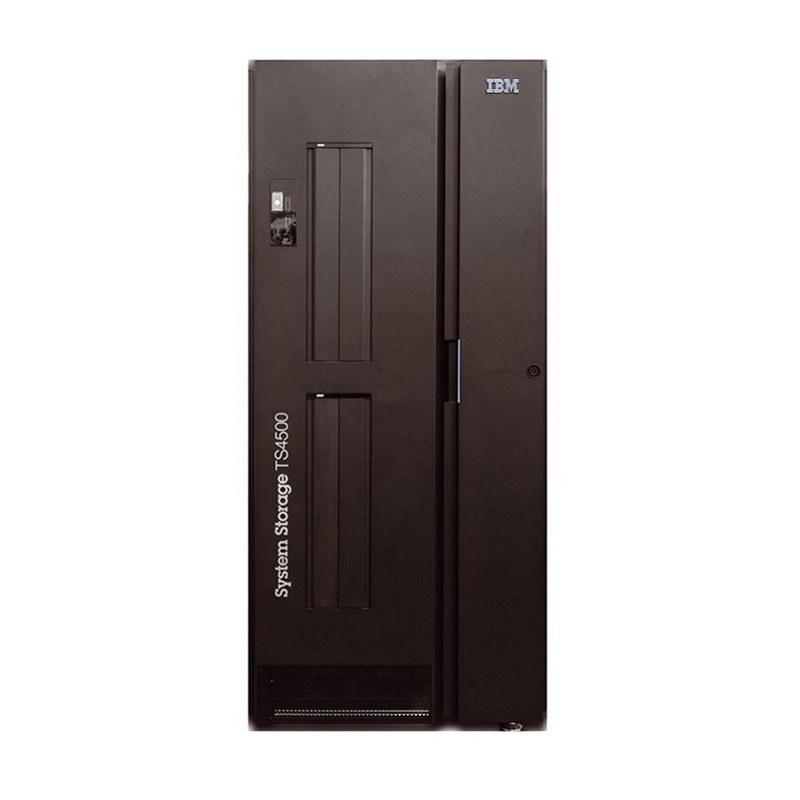
Hua Sheng Bo Ye offers enterprise IT products, including the IBM Ts4500 tape library, servers, and storage systems. For organizations planning to upgrade their backup infrastructure or integrate tape storage into an existing environment, reviewing the available equipment alongside workload requirements can help identify a suitable configuration. Considering the complete storage environment makes it easier to align backup operations with data growth, recovery needs, and long-term infrastructure plans.
Conclusion
Backup workflow efficiency depends on how well scheduling, drive availability, media handling, and data transfer work together. A delay in any one of these areas can extend backup windows, even when the storage system has sufficient capacity. By monitoring job behavior, identifying recurring bottlenecks, and adjusting workflows according to actual resource demand, organizations can improve the consistency of tape-based backup operations. A well-managed Tape Library System supports more predictable data protection by coordinating storage resources with the needs of each backup workload.
FAQ
1. Does adding more tape drives always improve backup performance?
No. Additional drives may help when drive availability is the main bottleneck, but they will not necessarily resolve slow source storage, network congestion, or inefficient job scheduling.
2. Why can a backup job take longer even when tape capacity is sufficient?
Capacity and performance are different considerations. A job may be delayed by drive contention, cartridge handling, data transfer limitations, or backup software processing.
3. How often should backup workflows be reviewed?
Review them regularly and whenever data volumes, retention requirements, schedules, or storage infrastructure change. Recurring delays and missed backup windows are clear reasons to investigate.
4. What is the first step when a tape backup becomes unusually slow?
Check the job logs and determine where the delay occurs. Identifying whether the problem involves scheduling, media access, or data transfer is more effective than immediately replacing hardware.